Accessibility Tools

Skip to main content

Author: Mike Hopkins

Are your people Christmas shopping from work?

Almost half of people with social media accounts have admitted to falling for shopping scams. So if members of your team are doing a little last minute Christmas shopping from work, how can you be sure your business is protected?

New research shows that a massive 47% of people have clicked on links hoping to get a great deal, and instead ended up giving financial and personal details to cyber criminals.

That could mean they’re not only putting their own data and money at risk, but your device – and even your network – could be exposed, too.

It’s not just shopping scams that are fooling people online. Phishing links have tricked 36% of people into revealing personal data. Phishing is where you get an email that seems to be from a person or brand you trust, but it’s not.

The same number have fallen for gift card scams – that’s where criminals gain victims’ trust and persuade them to buy gift cards or online vouchers.

If an employee clicks a malicious link or downloads an infected file using their work device, the results for a business can be devastating. The risks go beyond the loss of data and reputation. The cost of downtime while you get going again is enough to put many people out of business for good.

So how can you protect your business against this kind of scam – right now, and throughout the year?

As well as having the right cyber security tools in place – such as firewalls, antivirus software, and strong password management – you should stay focused on training your people. Because your best line of defense is a team that recognizes a threat when they see one.

Make sure they’re aware of the latest scams, and that they know the warning signs to look out for. Advise everyone to check that links are genuine, websites are the real deal, and be suspicious of offers that look too good to be true.

And have a strong plan in place that kicks in the moment a security breach is spotted. Employees should all know to report any incidents immediately, and who they should inform. Acting quickly often lessens the impact of a data breach and makes it faster and less expensive to fix.

As always, if you’d like further help or advice, get in touch.

Published with permission from Your Tech Updates.

Zoom wants to be the new Teams

You think Zoom, you think video calls. For millions around the world, it’s a tool they rely on at work every day.

But for productivity, collaboration and workplace integration (as well as video calls), it’s Microsoft Teams that’s leading the way. Its tight integration with other Microsoft 365 services makes it so easy.

Now Zoom is looking for a piece of that action with the launch of a whole suite of features and services. They’re clearly designed to take on Teams and Slack head-to-head.

These will include email, a calendar app, and a virtual co-working space called Zoom Spots. Meanwhile a bunch of upgrades to the Zoom One platform are aiming to improve collaboration, keep chats flowing, and keep projects moving.

While it feels like a logical step for the video conferencing giant, it remains to be seen how widely adopted the new services will be. And before we recommend it to our clients, we’ll want to know that the levels of support, reliability and security are all bulletproof.

Many businesses are already committed to Microsoft Teams, which releases its own improvements almost on a weekly basis. But this is an interesting new development and we’ll be watching what happens carefully.

If you want to know more about the best tools to keep your team working smoothly together, just get in touch.

Published with permission from Your Tech Updates.

Are you losing hours each week setting up video calls?

You could be losing a full-time working week for every member of your team, thanks to the hassle of setting up video calls.

Video conferencing has revolutionized team meetings, and saves a huge amount of travel time. But we’re still not getting the full benefit from the new technology, according to new research.

Employees aged between 18 and 24 take up to 10 minutes to get set up for each remote meeting.

Times that by a typical five meetings a week, and it’s suddenly lost you 40 hours every year. That’s a whole working week of wasted time – a figure that gets even higher when you look at older age brackets.

It isn’t necessarily a result of differing technological know-how. The research shows that employees blame the tech itself for the loss of productivity.

Almost a third of people said they didn’t have the right tools for the job, and 23% even said they felt excluded from remote meetings thanks to inadequate tech.

Employees often feel that the audio-visual (AV) technology they’re provided for remote and hybrid working simply isn’t up to the job. That means poor microphones that don’t play ball, jittery webcams that interfere with communication, or the wrong choice of video calling software. All that makes meetings harder to set up and causes them to take longer than they should.

Despite this, businesses that offer remote and hybrid working are reaping the rewards in many other areas, including staff engagement and performance.

But there is a solution.

Assess your employees’ AV technology to make sure their tools are not slowing them down – new webcams and microphones could be a cheap and simple fix.

It’s also a good idea to ask your employees to find out where they see that problems are occurring. If they are finding your existing system difficult to use, or slow to log in to, you should consider alternative options or better training.

If this is something that’s slowing you down, we can help – just get in touch.

Published with permission from Your Tech Updates.

Why you will not be fine on this Cloud9

We go to a lot of effort working to protect our clients from online security threats. These could come in the form of key loggers that record you as you enter your login information, or DDoS (Distributed Denial of Service) attacks, which overwhelm a service with fake traffic, causing it to crash.

As part of our service, we always advise our clients to install software updates as soon as they become available, and support them through the process where they need help.

But if you visit a website that asks you to install an Adobe Flash update… STOP!

Flash itself was actually discontinued in 2020 and is no longer supported, so you should assume that any Flash update messages will be a security threat.

Currently, fake Flash messages are being used as a cover for a new ‘botnet’ campaign that installs a malicious browser extension, called Cloud9. If you use Google Chrome or Microsoft Edge you could be a target.

A botnet forms a group of infected devices that are controlled as one, without the owners’ knowledge, stealing sensitive data, sending spam, or performing DDoS attacks.

Worse still, the Cloud9 botnet will attempt to install additional malware to your device or network if it’s not stopped in time.

This type of attack is hard to spot because it looks like a genuine request, and just about anyone can become a target.

But there are things you can do to protect your business.

First, make everyone aware of the threat. If your people know what to look out for it’s less likely they’ll install the update in the first place.

Next, make sure everyone’s running the latest version of their browser and that security software is up to date.

Finally, enable Enhanced Protection in your browser’s Privacy and Security settings. This will give you a warning if you stumble upon a risky website or download.

We can help you keep your business protected from cyber criminals. Just get in touch.

Published with permission from Your Tech Updates.

Don’t walk the plank with pirated software

A huge number of small and medium-sized businesses would consider using pirated software to try and save money. A new study has revealed a surprising number of businesses willing to break the law to save costs. Our advice? Think twice before you walk the plank.

Right now, the most popular types of pirated software are project management tools, and marketing and sales software. But a huge 56% of business owners said they’d even think about using illegal cyber security software in an effort to cut costs.

Don’t do it.

Not only is pirated software unsupported – so if you have a problem with it (which you probably will) there’s no help available to rectify the issue – but it can open your business up to bigger problems too.

It’s common for cyber criminals to use pirated software to distribute malware. Some of this is designed to evade firewalls, which means once installed, it can spread malicious files beyond your device to your entire network. That can lead to your sensitive data being compromised or stolen.

The cost of putting things right after this kind of cyber attack can end up costing a fortune, and the pirated software can damage your devices by causing them to slow down or overheat.

We advise our clients to always use genuine software from a reputable source. If the cost of the software seems too good to be true… it probably is.

But there’s more you can do. You should prevent unauthorized employees from downloading software that could be harmful by managing admin rights properly. And you should ensure your whole team has regular cyber security awareness training to make everyone aware of the risks to your business data.

If you’d like help finding genuine software for your business, or creating a cyber security plan, just get in touch.

Published with permission from Your Tech Updates.

Free photos of Voicemail

What Are the Most Helpful VoIP Features for Small Businesses?

Just five or six years ago, VoIP was still considered a “different” type of business phone system. One that wasn’t the norm. But the pandemic changed that way of thinking. Now internet-based phone systems aren’t simply the norm. They’re mandatory for business continuity.

During the pandemic, VoIP and video conferencing have skyrocketed by over 210%. This is largely due to the move to remote work and hybrid offices. Sixty-seven percent of surveyed companies say switching to VoIP helps improve call handling.

So, no longer is the business phone system tied to a physical location. This enables fluid management of a business with staff spread out over many locations.

Additionally, VoIP significantly reduces costs for businesses. The technology is much cheaper to use than a traditional landline-based system. Calling plans are also often less expensive, and a company can add new numbers for very little cost.

VoIP has several helpful features for small businesses. But owners are busy and may not have time to have all of them enabled.

What are the best features to drive efficiency, productivity, and positive caller experience?

Here are some of the best features of cloud-based business phone systems to leverage.

Automated Attendant

In many small companies, the person answering the phone also has a lot of other duties. You can free up that person’s time and give the caller a better experience with an automated attendant.

An auto-attendant acts as a company directory. It will forward calls to the correct department or staff member for you. Record a pleasant greeting and ask the caller a few questions. Such as, “Press or say 1 for sales, 2 for technical support,” etc.

The caller gets the person they need without having to explain why they’re calling twice. Once to the person that answers the phone and once to the person they’re transferred to.

Find Me/Follow Me

What’s the most favorite user feature for VoIP? According to 77% of surveyed employees, it’s the Find Me/Follow Me feature. This includes the ability to use a virtual phone number that is accessible from all devices. Staff can also transfer calls from one device to another with ease.

Whether you are on a PC, in a conference room, or on your smartphone, you can get your calls. This feature reduces friction and allows people to give out a single phone number. Callers can then use that number to reach the person via mobile, home office, or onsite office.

Hold Music

Playing pleasant music while your callers are on hold might seem like a small thing. But it can have a big impact on customer satisfaction and lead generation activities.

We found some eye-opening statistics from a study on hold music versus silence. In the study, researchers kept people on hold for 1 minute. Results showed:

  • On hold in silence: Over 50% of the callers hung up
  • On hold with music: Only 13% of the callers hung up

Additionally, 45% of the silent group that did not hang up thought they were on hold for 3-5 minutes. They were on hold for just one minute. While on the music side, 56% of people thought they were on hold for less than one minute.

So, you can see the power of activating that one simple feature of your VoIP system. You may notice happier customers and fewer leads hanging up before they reach anyone.

Voicemail Transcription to Email

When you’re coming out of a meeting, going through a string of voicemails can be frustrating. You have to listen to each one to figure out the people to call back first.

Voicemail to email in VoIP services, provides recorded voicemails emailed to you. This also comes with a transcription of the message. You can quickly glance through the emails and scan the text to rank callbacks. No need to listen to every message first.

Ring Groups

Ring groups are an especially helpful feature if you have a small team. It allows a group of numbers to ring simultaneously until one person in the group picks up.

This means that another staff member may be able to assist a caller, rather than them needing to leave a message. Ring groups are great to set up for sales teams, accounting teams, and customer support teams.

Call Reporting

Another bonus of VoIP phone systems over analog is that you get real-time call reporting. What are your busiest times when you need more staff? Do you have a problem with calls not getting answered fast enough?

Your call reporting can give you insight into those things and more. Make sure you check out these reports and then automate the ones you like so you’ll see them regularly.

Local Support

This isn’t a system feature, but it’s important to have. If you sign up for VoIP from a company halfway around the world, you don’t have any local support when you need it.

Having someone that can come to your office is important. They can set up VoIP desk phones and help you optimize ring groups, mobile apps, and more. Your business phone system is one of the most important pieces of technology you have. Make sure you have the local support you need to keep it operating reliably.

Looking for Local VoIP Solutions?

Get expert VoIP services and local support. We’ll integrate your cloud-based phone system with your entire technology environment. Contact us today for a free consultation.


Featured Image Credit

This Article has been Republished with Permission from The Technology Press.

Free photos of Ransomware

Simple Guide to Follow for Better Endpoint Protection

Endpoints make up much of a company’s network and IT infrastructure. This is a collection of computers, mobile devices, servers, and smart gadgets. As well as other IoT devices that all connect to the company network.

The number of endpoints a company has will vary by business size. Companies with less than 50 employees have about 22 endpoints. Small businesses with 50-100 employees have roughly 114. Enterprise organizations with 1,000+ employees average 1,920 endpoints.

Each of those devices is a chance for a hacker to penetrate a company’s defenses. They could plant malware or gain access to sensitive company data. An endpoint security strategy addresses endpoint risk and puts focused tactics in place.

64% of organizations have experienced one or more compromising endpoint attacks.

In this guide, we’ll provide you with straightforward solutions. Solutions focused on protection of endpoint devices.

Address Password Vulnerabilities

Passwords are one of the biggest vulnerabilities when it comes to endpoints. The news reports large data breaches all the time related to leaked passwords. For example, there is the RockYou2021 breach. It exposed the largest number of passwords ever – 3.2 billion.

Poor password security and breaches make credential theft one of the biggest dangers to cybersecurity.

Address password vulnerabilities in your endpoints by:

  • Training employees on proper password creation and handling
  • Look for passwordless solutions, like biometrics
  • Install multi-factor authentication (MFA) on all accounts

Stop Malware Infection Before OS Boot

USB drives (also known as flash drives) are a popular giveaway item at trade shows. But an innocent-looking USB can actually cause a breach. One trick that hackers use to gain access to a computer is to boot it from a USB device containing malicious code.

There are certain precautions you can take to prevent this from happening. One of these is ensuring you’re using firmware protection that covers two areas. These include Trusted Platform Module (TPM) and Unified Extensible Firmware Interface (UEFI) Security.

TPM is resistant to physical tampering and tampering via malware. It looks at whether the boot process is occurring properly. It also monitors for the presence of anomalous behavior. Additionally, seek devices and security solutions that allow you to disable USB boots.

Update All Endpoint Security Solutions

You should regularly update your endpoint security solutions. It’s best to automate software updates if possible so they aren’t left to chance.

Firmware updates are often forgotten about. One reason is that they don’t usually pop up the same types of warnings as software updates. But they are just as important for ensuring your devices remain secure and protected.

It’s best to have an IT professional managing all your endpoint updates. They’ll make sure updates happen in a timely fashion. They will also ensure that devices and software update smoothly.

Use Modern Device & User Authentication

How are you authenticating users to access your network, business apps, and data? If you are using only a username and password, then your company is at high risk of a breach.

Use two modern methods for authentication:

  • Contextual authentication
  • Zero Trust approach

Contextual authentication takes MFA a step further. It looks at context-based cues for authentication and security policies. These include several things. Such as, what time of day someone is logging in, their geographic location, and the device they are using.

Zero Trust is an approach that continuously monitors your network. It ensures every entity in a network belongs there. Safelisting of devices is an example of this approach. You approve all devices for access to your network and block all others by default.

Apply Security Policies Throughout the Device Lifecycle

From the time a device is first purchased to the time it retires, you need to have security protocols in place. Tools like Microsoft AutoPilot and SEMM allow companies to automate. They deploy healthy security practices across each lifecycle phase. This ensures a company doesn’t miss any critical steps

Examples of device lifecycle security include when a device is first issued to a user. This is when you should remove unnecessary privileges. When a device moves from one user to another, it needs to be properly cleaned of old data. And reconfigured for the new user. When you retire a device, it should be properly scrubbed. This means deleting all information and disconnecting it from any accounts.

Prepare for Device Loss or Theft

Unfortunately, mobile devices and laptops get lost or stolen. When that happens, you should have a sequence of events that can take place immediately. This prevents company risk of data and exposed business accounts.

Prepare in advance for potential device loss through backup solutions. Also, you should use endpoint security that allows remote lock and wipe for devices.

Reduce Your Endpoint Risk Today!

Get help putting robust endpoint security in place, step by step. We can help! Contact us today for a free consultation.


Featured Image Credit

This Article has been Republished with Permission from The Technology Press.

silver click pen

Everything You Need to Know About Microsoft Viva Sales

Data entry can be a real drag for salespeople. The time they spend on administrative tasks is time away from customer interactions. But that data is vital.

It’s important to capture customer orders, quotes, needs, and more. Lead and sales reporting help sales managers know where to direct their attention. Analytics also help drive more efficient ways of closing the deal.

Microsoft has taken up the mantle of this challenge. It is about to launch a new digital experience for sales teams. Microsoft Viva Sales is part of the “Viva” line of applications. These include things like Viva Insights for improved staff wellbeing. As well as Viva Learning for staff development.

The Viva apps natively integrate with MS Teams and the Microsoft 365 ecosystem. They include automation designed to eliminate boring tasks and enable more work engagement.

Viva Sales is a “CRM helper” application. We’ll go through some of the most asked questions about the app, its features, and when you can get it.

What Is Microsoft Viva Sales?

Viva Sales is an application that will provide sales and lead insights. These insights populate throughout Office 365 and Microsoft Teams. The focus of the app is to cut unnecessary manual entry to give sellers more time to sell.

How Does Viva Sales Work? Is It a CRM?

Viva Sales is NOT going to replace your normal CRM platform. Instead, it connects to your CRM and other sales-related apps. It leverages the data from these connections. This makes it easier for salespeople to get the prospect data they need to enable their work.

Salespeople spend approximately 34% of their time on administrative tasks.

Viva Sales Basics

Some of the core advantages of Viva Sales are:

  • Eliminate Forms: Data entry for sales professionals is greatly reduced. This frees them up for more customer relationship building.
  • Powerful Data Leveraging: Viva Sales connects to several platforms. This includes non-Microsoft programs and CRMs. The integration allows salespeople to cross-reference data points and gain valuable insights.
  • AI-Driven Help: Salespeople will get prompts that are AI-driven. These suggestions and reminders help them along in the sales process with a lead.

Interconnected Interface

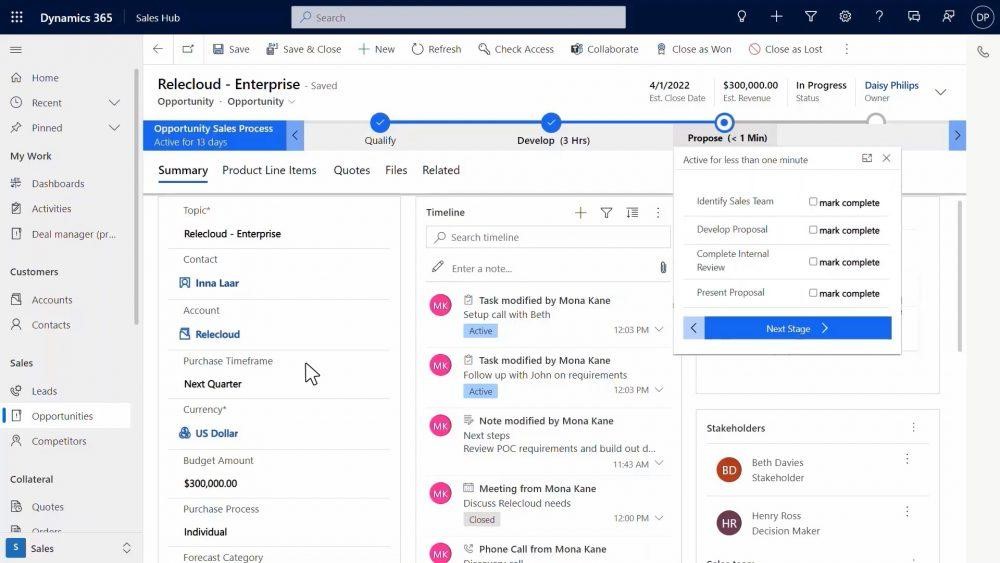
Microsoft Viva Sales provides sales-specific insights throughout the various M365 applications. Salespeople natively see important customer details, wherever they are. Including in their Outlook Calendar or when in their Microsoft or non-Microsoft CRM.

Microsoft Viva Sales
Image courtesy of Microsoft

Viva Sales Features

Tag to Capture Sales Interactions

Tagging is also known as using someone’s “@name” to get their attention. Tagging is a popular software integration used throughout many cloud-based apps. It’s also used within Microsoft 365.

Salespeople can use the familiar tagging function. They can use it to capture data from another M365 application for a prospect or customer. This includes adding someone to a list of customers by using a tag for their Viva Sales name. The system will capture the contextual information on the lead or customer.

Collaborate

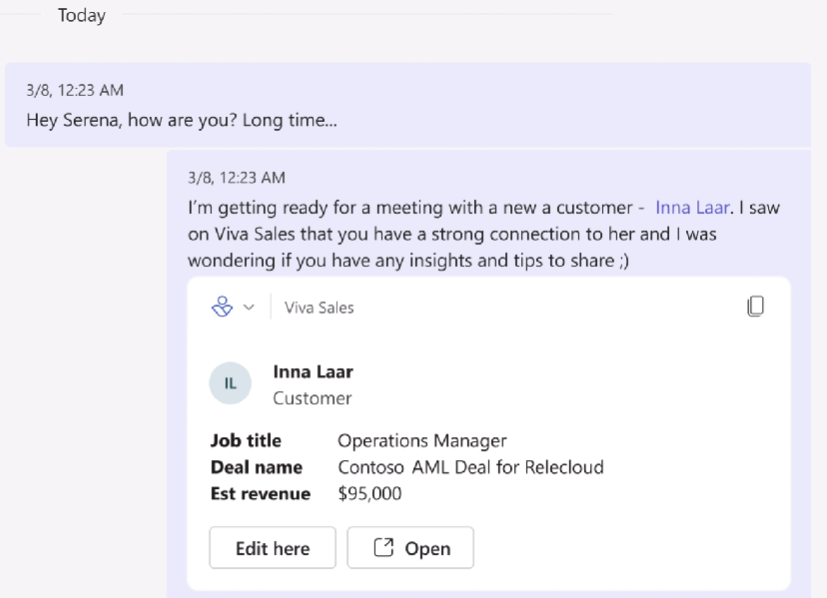
Viva Sales makes it easier than ever to collaborate with your team on a sales prospect or customer. You don’t have to chase down information to copy/paste into a message. Use that tagging function to populate lead information from Viva Sales in seconds.

Viva Sales Feature - Collaborate
Image courtesy of Microsoft

You can also easily edit or open a lead/customer record. No need to look for and open another app. The process gets you where you need to go in as few clicks as possible.

Call Summaries & Integrated Data

One thing that customers and salespeople hate is a lack of understanding. For example, when a salesperson doesn’t know about a recent customer interaction.

This can happen when company communication systems store data from different sources separately. Such as phone call messages being in one place and a customer’s website chat session being in another.

Viva Sales brings all that customer engagement data together into a single view. This allows the salesperson to see call summaries and capture call action items.

Download & Customize

Salespeople that prefer an Excel view of their contact list can get this from Viva Sales. Download lead and customer lists. Customize the application per the organization’s needs.

When Will Viva Sales Be Available?

Microsoft has announced that Viva Sales will be “coming in Q4 2022.” There is no exact date for the launch yet, but you can be sure that we will keep an eye on this!

In the meantime, you can watch a video explaining the application on Microsoft’s site here.

Take Advantage of Microsoft Viva Automation

Microsoft built the Viva suite of digital experience apps for productivity. These apps help employees find information faster, feel more connected, and work more productively.

Now is the perfect time to explore those that have already launched and get ready for Viva Sales.

Contact us today for a free consultation to improve your team’s digital experience.


Featured Image Credit

This Article has been Republished with Permission from The Technology Press.